TaxTim Blog
How to update your SARS contact details without logging in
Step-by-step guide when you can’t receive your OTP from SARS
By Ursula Lilje · Updated · 2 minute read
If you’re not receiving your SARS eFiling OTP, you’re not alone. This usually happens when SARS has an old cellphone number or email address on record.
The good news?
You can update your SARS contact details directly from the SARS home page — without logging in.
Below is a simple, step-by-step guide to help you fix this and start receiving your OTP code again.
Why You’re Not Receiving Your SARS OTP
|
What You’ll Need Before You Start
|
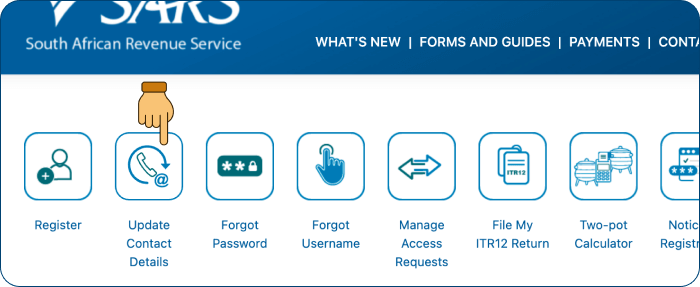
Step 1: Go to the SARS eFiling Website
Got to www.sarsefiling.co.za and click on “Update Contact Details”. 
You should not be logged into eFiling.
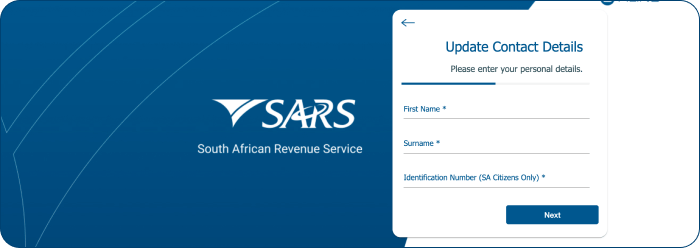
Step 2: Enter your Name, Surname and Id Number
Enter your personal details and click “Next”
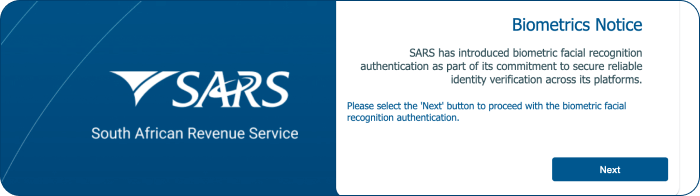
Step 3: Follow the Biometrics instructions
Click “Next” on the Biometrics Notice message.
Follow the facial recognition instructions. Here are some hints to help with this step:
- Ensure you are in a well lit (bright) area so the camera can see you clearly.
- Remove any obstructions that could hide part of your face.
- Remove glasses
- Remove hats
- Remove hair hanging infront of your face
- Make sure your face is centered in the circle and not cut off in the camera view.

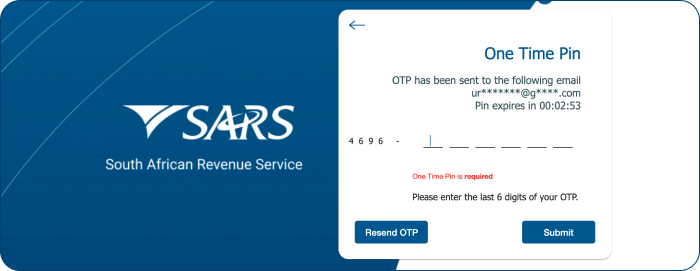
Step 4: Indicate how you want to receive your OTP
SARS will ask you how you want to receive your One Time PIN (OTP) - by email or by SMS. Choose an option then enter the last 6 digits of the OTP.
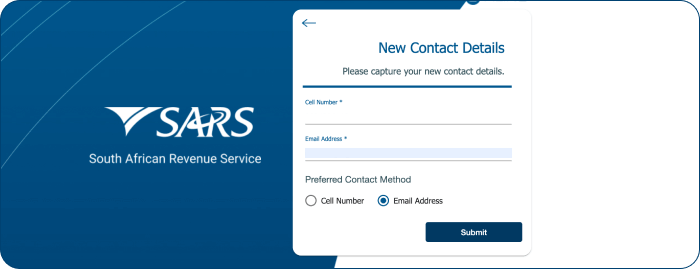
NOTE: Once you are finished with these steps, return to the TaxTim connection page and click on the "Details updated, retry connection" button to try again with your new contact details.